Connect Azure
Catalog a storage account every 6 hours with a pipeline that authenticates to Entra ID as itself, so there's no client secret or account key to create, store or rotate.
Before you start
- You hold
ingestion.adminacross the whole catalog in your instance. - You have an Entra ID tenant where you can create app registrations.
- You have an Azure subscription where you can assign roles. This page uses a storage account called
ordersarchivein the resource groupdata-prod.
How it works
Before each run, your instance gives the pipeline a 5-minute token with the subject pipeline:<pipeline-name>. A federated credential on an app registration lets that token act as the application, which never has a password or certificate. Keyless pipelines explains the model.
Values you'll need
Entra ID matches the issuer, subject and audience exactly. A wrong subject is accepted when you save it and only fails at the first run.
- Issuer:
https://<instance>.marmotdata.cloud, with no trailing slash. Always themarmotdata.cloudaddress, even with a custom domain - Subject:
pipeline:blobs - Audience:
api://AzureADTokenExchange - Client ID: The app registration's Application (client) ID, written
<client-id>below
Your first pipeline
Create an app registration for the pipeline
Give each pipeline its own app registration, with no client secret and no certificate.
- Console
- Azure CLI
- Terraform
- In the Microsoft Entra admin center, open App registrations and select New registration.
- Enter
marmot-blob-pipelineas the Name and select Register. - Note the Application (client) ID on the Overview page.
az ad app create --display-name marmot-blob-pipeline \--query appId --output tsvThe command prints the client ID. Create the app's service principal with it:
az ad sp create --id <client-id>provider "marmot" {host = "https://<instance>.marmotdata.cloud"}provider "azurerm" {features {}}data "azurerm_client_config" "current" {}resource "azuread_application" "marmot_blob" {display_name = "marmot-blob-pipeline"}resource "azuread_service_principal" "marmot_blob" {client_id = azuread_application.marmot_blob.client_id}Trust the pipeline
Add a federated credential for the
blobspipeline to the app registration.- Console
- Azure CLI
- Terraform
- In the app registration, open Certificates & secrets → Federated credentials and select Add credential.
- Choose Other issuer and enter the issuer and the subject as the Subject identifier.
- Enter
marmot-blobsas the Name, keep the default audience and select Add.
az ad app federated-credential create --id <client-id> --parameters '{"name": "marmot-blobs","issuer": "https://<instance>.marmotdata.cloud","subject": "pipeline:blobs","audiences": ["api://AzureADTokenExchange"]}'The issuer and subject come from the pipeline you declare in the last step, so a rename updates the credential too:
resource "azuread_application_federated_identity_credential" "marmot_blob" {application_id = azuread_application.marmot_blob.iddisplay_name = "marmot-blobs"issuer = marmot_pipeline.blobs.issuersubject = marmot_pipeline.blobs.subjectaudiences = ["api://AzureADTokenExchange"]}Grant the app access
Grant the app Storage Blob Data Reader on the storage account.
- Console
- Azure CLI
- Terraform
- In the Azure portal, open the
ordersarchivestorage account, then Access control (IAM), and add a role assignment. - Choose Storage Blob Data Reader, select
marmot-blob-pipelineas the member and assign the role.
SCOPE=$(az storage account show --name ordersarchive \--resource-group data-prod --query id --output tsv)az role assignment create --assignee <client-id> \--role "Storage Blob Data Reader" --scope "$SCOPE"data "azurerm_storage_account" "orders_archive" {name = "ordersarchive"resource_group_name = "data-prod"}resource "azurerm_role_assignment" "marmot_reads_blobs" {scope = data.azurerm_storage_account.orders_archive.idrole_definition_name = "Storage Blob Data Reader"principal_id = azuread_service_principal.marmot_blob.object_id}Create the pipeline
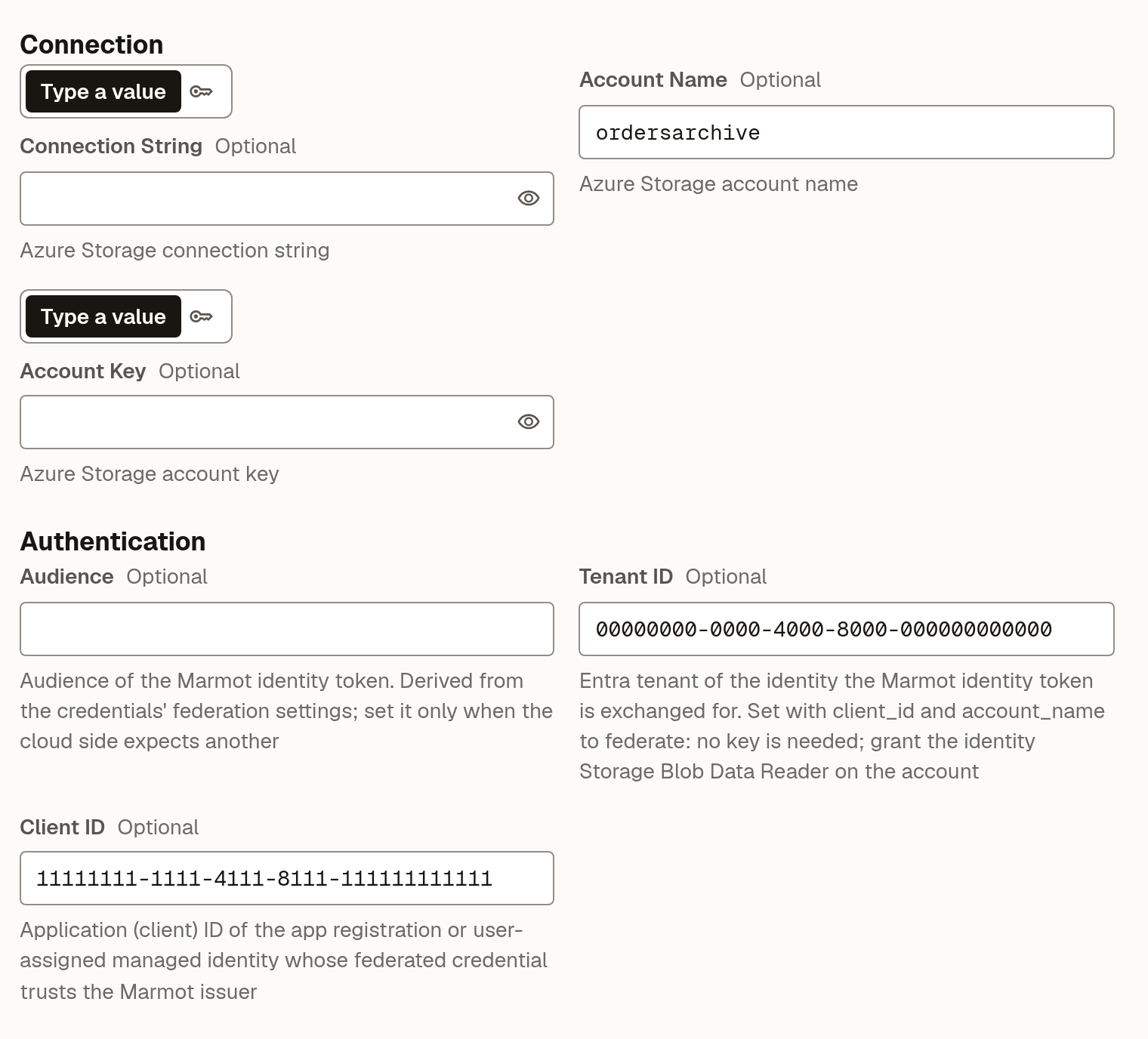
Point the plugin at the storage account with the tenant and client IDs. Leaving the key empty is what tells the plugin to sign in as the pipeline.
- UI
- Terraform
- Open Plugins and select Azure Blob Storage under Add a source.
- Enter
blobsas the Pipeline name and select Continue. - Set Account Name to
ordersarchive, Tenant ID to your tenant and Client ID to the app's client ID, leave the keys empty and select Check and continue. - Turn on Run on a schedule, set it to
0 */6 * * *and select Create pipeline.
 resource "marmot_pipeline" "blobs" {name = "blobs"plugin_id = "azureblob"cron_expression = "0 */6 * * *"config = jsonencode({account_name = "ordersarchive"tenant_id = data.azurerm_client_config.current.tenant_idclient_id = azuread_application.marmot_blob.client_id})}
Check that it worked
The pipeline runs at its next scheduled time. To run it now, open it under Plugins and select Run now. When the run succeeds, your containers appear in Discover.
From the CLI, marmot runs list --pipelines blobs lists its runs.
Use a managed identity instead
A user-assigned managed identity works in place of the app registration: add the federated credential to the identity with az identity federated-credential create and use its client ID in the config.
When a source needs a password
An Azure Database for PostgreSQL or self-managed database can't federate, so its pipeline needs a real password. Keep it in Key Vault and let Marmot read it at run time through a secret store. The store gets an app registration of its own and authenticates as the subject secretStore:<store-name>.
Trust the store and grant it the vault
Create an app registration called
marmot-secret-storewith a federated credential for the subjectsecretStore:azure-prod, then grant it Key Vault Secrets User on the vault. That role reads secret values and nothing else, and needs a vault that uses the Azure RBAC permission model.- Console
- Azure CLI
- Terraform
- Register
marmot-secret-storeand note its Application (client) ID. - Under Certificates & secrets → Federated credentials, add a credential for Other issuer with the issuer, the subject
secretStore:azure-prodand the Namemarmot-azure-prod. - In the Azure portal, open the key vault, then Access control (IAM), and assign Key Vault Secrets User to
marmot-secret-store.
az ad app create --display-name marmot-secret-store \--query appId --output tsvaz ad sp create --id <store-client-id>az ad app federated-credential create --id <store-client-id> --parameters '{"name": "marmot-azure-prod","issuer": "https://<instance>.marmotdata.cloud","subject": "secretStore:azure-prod","audiences": ["api://AzureADTokenExchange"]}'VAULT=$(az keyvault show --name orders-vault --query id --output tsv)az role assignment create --assignee <store-client-id> \--role "Key Vault Secrets User" --scope "$VAULT"resource "azuread_application" "marmot_secrets" {display_name = "marmot-secret-store"}resource "azuread_service_principal" "marmot_secrets" {client_id = azuread_application.marmot_secrets.client_id}resource "azuread_application_federated_identity_credential" "marmot_secrets" {application_id = azuread_application.marmot_secrets.iddisplay_name = "marmot-azure-prod"issuer = marmot_secret_store_azure.prod.issuersubject = marmot_secret_store_azure.prod.subjectaudiences = [marmot_secret_store_azure.prod.audience]}data "azurerm_key_vault" "orders" {name = "orders-vault"resource_group_name = "data-prod"}resource "azurerm_role_assignment" "marmot_reads_secrets" {scope = data.azurerm_key_vault.orders.idrole_definition_name = "Key Vault Secrets User"principal_id = azuread_service_principal.marmot_secrets.object_id}Create the store and register the secret
Create a store named
azure-prodthat signs in as the application, then register the secret in it.- UI
- Terraform
- Open Settings → Secret stores and select New secret store.
- Enter
azure-prodas the Name. - Under Where do the secrets live?, choose Azure Key Vault.
- Set Tenant ID and Client ID to the store app's values and select Create secret store.
- On the store's page, select Register secret, enter
https://orders-vault.vault.azure.netas the Vault URI andorders-db-passwordas the Name, then select Register secret.
resource "marmot_secret_store_azure" "prod" {name = "azure-prod"tenant_id = data.azurerm_client_config.current.tenant_idclient_id = azuread_application.marmot_secrets.client_id}resource "marmot_secret_store_azure_secret" "orders_db_password" {store = marmot_secret_store_azure.prod.idvault_uri = data.azurerm_key_vault.orders.vault_uriname = "orders-db-password"}Use the secret in a pipeline
Create the PostgreSQL pipeline with its password read from the store. No version is pinned, so creating a new version in Key Vault is the whole rotation.
- UI
- Terraform
- Open Plugins and select PostgreSQL under Add a source.
- Enter
ordersas the Pipeline name and select Continue. - Fill in Host and User. For Password, choose From secret store and pick
orders-db-password. - Select Check and continue, set a schedule and select Create pipeline.
resource "marmot_pipeline" "orders" {name = "orders"plugin_id = "postgresql"cron_expression = "0 * * * *"config = jsonencode({host = "orders-db.example.com"user = "marmot_reader"})secrets = {password = marmot_secret_store_azure_secret.orders_db_password.id}}
Troubleshooting
| What you see | What to do |
|---|---|
account_key is required when using account_name, unless ... | Set both Tenant ID and Client ID. |
| No matching federated identity record | The issuer, subject or audience differs from what Marmot sent. Check the subject names the pipeline's current name and the issuer has no trailing slash. |
| Authenticated but the request is refused | The role assignment is missing, at the wrong scope or not yet propagated. Role assignments can take a few minutes. |
Next steps
- Grant and check access: decide who can see the new containers.
- Secret stores: more about stores, Vault and rotation.
- Connect Google Cloud or Connect AWS if you catalog more than one cloud.