AI Agent Database Access: Governed SQL Without Passwords
To give an AI agent safe access to a database, give the agent its own identity, let it run only read-only SQL that's checked against its permissions before it reaches the database, and record every query it runs. A database password in the agent's configuration does none of this, which is why it's the setup a security review will rightly refuse. An agent that can read your schemas can tell you which table holds last week's failed orders, but to tell you how many there were it has to query the table, and that second step is where most teams stall.
This guide covers what can go wrong when agents query databases, what safe access looks like, the main ways to wire it up and how to audit what agents run.
Why database access is the hard part
Context tells an agent where the data is; access lets it use the data. A catalog exposed over MCP can tell an agent what tables exist, what their columns mean and who owns them. Plenty of useful questions stop there. Many don't: "how many orders failed yesterday", "which customers churned this month", "is this number in the dashboard right".
Answering those needs SQL against a real source, and that brings in everything you'd worry about with a new analyst, plus a few problems that are specific to agents: they act at machine speed, they can be steered by text they read and they can't be asked afterwards what they meant to do.
The risks of giving an agent a database password
Connecting an agent directly to a database with a shared credential is quick to set up and hard to defend:
- No attribution. Every query arrives as the same database user, so the database log can't tell one agent from another, or an agent from the person who set it up.
- Over-broad reads. A user with access to a schema can read every table in it, including the ones holding personal data the agent has no reason to see.
- Writes and damage. If the credential can write, a mistaken or injected statement can update or drop data. Text-to-SQL libraries have shipped prompt injection fixes for exactly this.
- Credentials in the wrong place. The password lives in the agent's configuration, its environment or a prompt, wherever the agent runs.
- No way to revoke one agent. Taking access away means rotating a password that other things use.
- Nothing to review. When someone asks what an agent read last month, there's no record that answers it.
What safe database access for AI agents looks like
Treat an agent as a new kind of user with less judgement than a person, and govern it the same way. In practice that means:
- Its own identity. Each agent signs in as itself, typically a service account, so its access can be limited, reviewed and revoked without affecting anything else.
- No database password in the agent. The agent authenticates to whatever runs its queries. The credential for the source stays with the source's connection, out of the agent's reach.
- Read-only, enforced more than once. A database user that can only read, a check that refuses anything but a single read before it reaches the database and a read-only transaction around what runs. Prompt instructions aren't a control.
- Least privilege per table. Grants on the tables, or the data product, an agent needs, rather than the whole database.
- Checks before execution. A refused query never reaches the source, and the agent is told which permission it lacked.
- Limits. A timeout and a row cap, so a careless query can't run for an hour or pull a whole table.
- An audit of every query. Who ran what, against which tables, from which client and with what outcome, including refusals.
Three ways to connect agents to your data
Direct connection. The agent, or a text-to-SQL library inside it, connects to the database with a credential. This is the fastest route and the one with every risk above. If you take it, use a dedicated read-only database user per agent and accept that attribution and audit live only in the database's own logs.
A database MCP server. An MCP server for a specific database exposes tools that run SQL. Assistants like Claude and Cursor can use it without custom code, but the server usually holds a single credential, and governance is whatever that credential allows. Check whether it can enforce read-only, limit tables per caller and record queries.
A governed query gateway. People and agents send SQL to a gateway with their own identity. The gateway checks permissions, refuses what isn't allowed, runs the rest with the source's credentials and records every query. When the gateway is also your data catalog, the agent gets the context it needs to write the query, such as owners, definitions and which columns hold personal data, from the same place it runs it.
How the three approaches compare on the controls a security review asks about:
| Control | Direct connection | Database MCP server | Governed query gateway |
|---|---|---|---|
| Each agent has its own identity | Only with a database user per agent | Usually one shared credential | Yes |
| Read-only enforced before the query runs | Only through database grants | Depends on the server | Yes |
| Access limited to specific tables per agent | Only through database grants | Rarely | Yes, per caller |
| Every query recorded with who ran it | Only in the database's own logs | Rarely | Yes, in one audit across sources |
| Agent holds a database password | Yes | The server does | No |
| Schema, owners and definitions alongside the query | No | Schema only | Yes, when the gateway is also the catalog |
Text-to-SQL needs context as well as access
Most wrong answers from text-to-SQL come from picking the wrong table or misreading a column, not from bad SQL. An agent that can query but doesn't know that orders excludes refunds, or that "active buyer" has a specific definition, will write valid SQL that answers the wrong question.
That's why governed access works best alongside an AI context layer: the agent searches the catalog, reads the glossary term and the table's owner and description, checks lineage if it needs to and only then writes the query. Each query result can carry the same context, so the agent knows what it read.
Auditing agent queries
An audit log turns "what did the agent do" from a guess into a lookup. A useful record for each query includes:
- the statement and the source it ran against;
- who ran it, as a person or a service account and the agent acting through it;
- the client it came from, such as an editor, the API, a CLI or MCP;
- the tables it read, and what the catalog said about them at the time, such as owners and personal data columns;
- the outcome, including refusals and the permission that was missing;
- the row count and whether the result was cut off.
The rows themselves don't need to be in the log, and keeping them there creates a second copy of sensitive data to protect. Review the log regularly, and export it when a security or compliance review asks for evidence.
Governed data access with Marmot
Marmot is an open source data catalog that also works as a governed query gateway for the sources you connect. People run SQL from the Query editor, scripts from the CLI and agents from the query_data tool on Marmot's MCP server. Every data query follows the same path:
- The caller sends a statement and names a source, signed in as themselves or as a service account.
- Marmot checks the caller holds permission to query. A caller without it is refused before the statement reaches the source.
- The source's plugin refuses anything that isn't a single read. PostgreSQL runs the statement inside a read-only transaction that's always rolled back, and DuckDB opens its file read-only.
- The plugin runs the statement with the source's own credentials, so the agent never holds a database password, and returns rows up to the row limit.
- Marmot returns the rows alongside what the catalog knows about each table read: its owners, description and which columns hold personal data.
Marmot doesn't keep the rows. The query audit records the statement, who ran it and through which client, the tables it read, the row count and the outcome, for allowed and refused queries alike, and exports to CSV. Timeouts and row caps are set in configuration, at 60 seconds and 1,000 rows by default with a cap of 10,000. A refused caller can select Request access to ask the people who manage access.
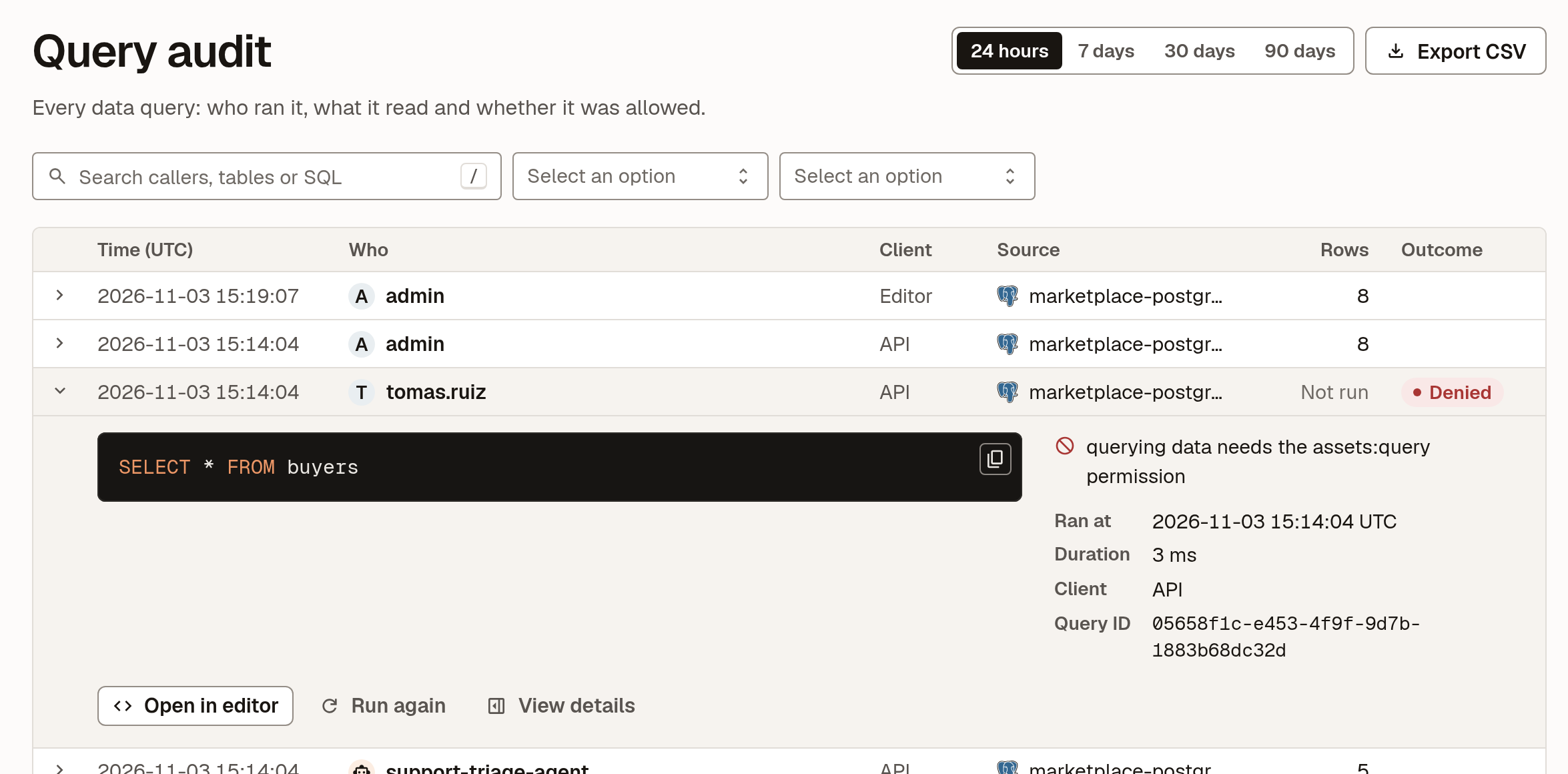
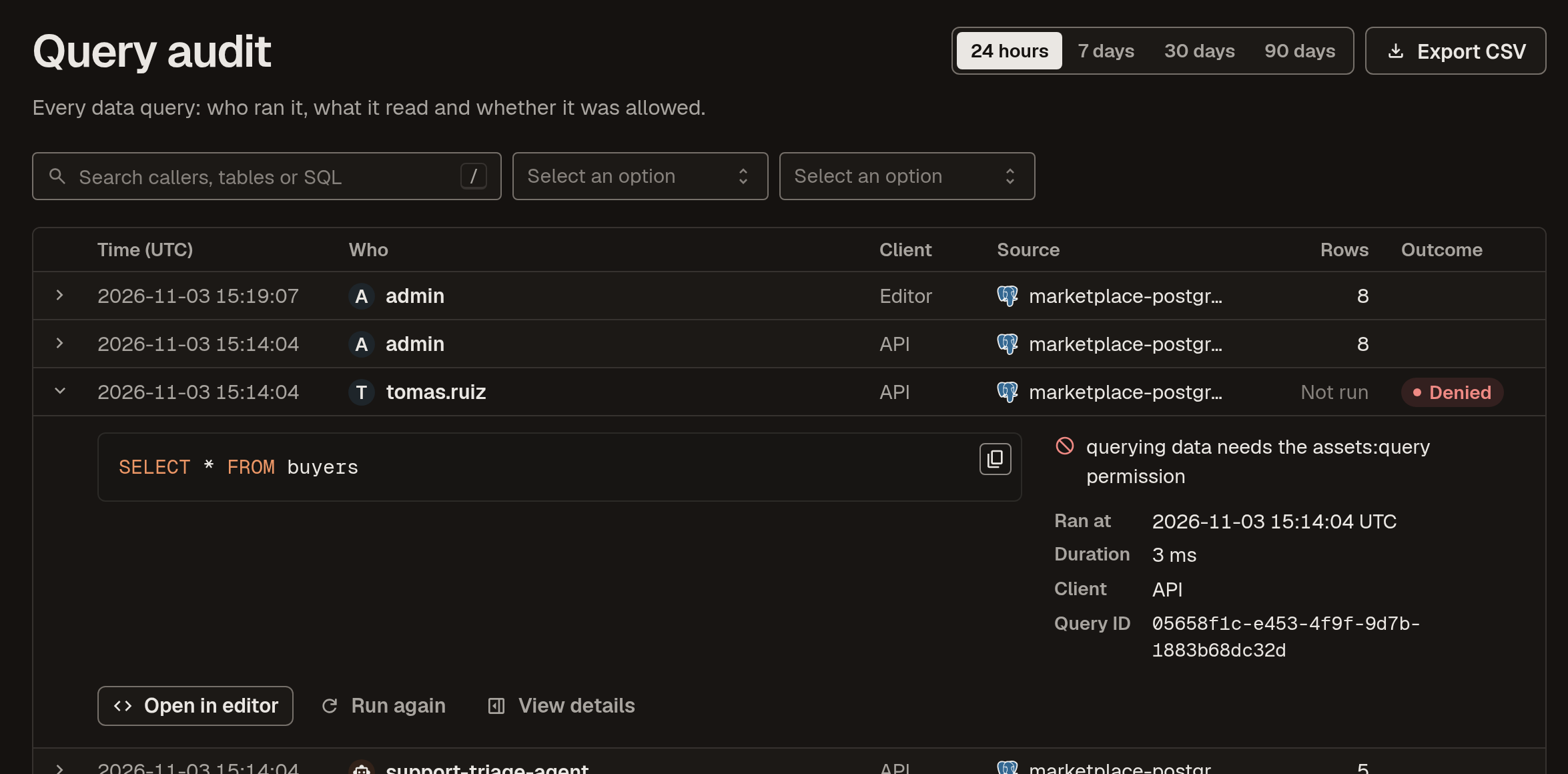
A refused query in the audit shows the statement, the caller and the permission they were missing:
Sources whose plugins support querying include PostgreSQL, MySQL, Google BigQuery, ClickHouse, Trino and DuckDB. A database on a private network can still answer: run its plugin inside that network and it serves queries over a connection it opens to Marmot, keeping its credentials there, so nothing connects into your network.
In open source Marmot, permission to query covers every queryable source. On Marmot Cloud, you grant query access on a source, a data product or a single table, and a statement runs only when every table it reads is covered by one of the caller's grants, so an agent given one data product can't wander into the rest of a database. Grants can carry an end date for access that's only needed for a while. Each agent gets its own service account, and when an agent's service account queries a table, Marmot records the agent in that table's lineage.
A checklist before you let agents query
- Give each agent its own service account, with keys that expire.
- Use a database user for each source that can only read what people should be able to query.
- Route agent SQL through one path that checks permissions before execution and refuses anything but reads.
- Grant per table or data product where you can, rather than per database.
- Set a timeout and a row cap.
- Record every query, allowed or refused, without storing result rows.
- Give agents catalog context, owners, definitions and lineage, alongside access.
- Review the audit log, and remove grants nobody uses.
Frequently asked questions
Is it safe to give an AI agent database access?
It can be, when the agent has its own identity, can only run reads, is limited to the tables it needs and every query is checked before it runs and recorded afterwards. The unsafe version is the common one: a shared database password in the agent's configuration, with nothing between the model's SQL and the database and no record of who ran what.
Should an AI agent have its own database credentials?
An agent should have its own identity, but it doesn't need to hold a database password. With a governed query gateway, the agent authenticates to the gateway with its own key, the gateway checks its permissions and the source runs the statement with credentials the agent never sees. Revoking the agent's key then ends its access without rotating a database password.
How do you stop an AI agent writing to a database?
Enforce read-only in more than one place. Give the source a database user that can only read, refuse any statement that isn't a single read before it reaches the database and run what remains in a read-only transaction. Instructions in the prompt aren't a control, because prompt injection can override them.
What should an audit log of agent queries record?
At minimum: the statement, the source it ran against, which agent ran it and through which service account, the client it came from, the tables it read, the outcome including refusals and why, the row count and when it ran. The rows themselves don't need to be stored, and usually shouldn't be.
Can AI agents query databases over MCP?
Yes. An MCP server can expose a tool that runs SQL, so Claude, Cursor and other MCP clients can query a database in natural language. What matters is what sits behind the tool. Marmot's query_data tool checks the caller's permission before the statement reaches the source, refuses anything that isn't a single read and records the query in its query audit.
What is a governed query gateway?
A governed query gateway sits between callers and your databases. People and agents send it SQL with their own identity; it checks their permissions, refuses statements that aren't allowed, runs the rest with the source's credentials, applies limits such as row caps and timeouts and records every query. Marmot works this way for the sources you connect to it.
Related
- What Is an AI Context Layer?
- MCP for Data: Connecting AI Agents to Your Catalog
- Data Governance for the AI Era
- What Is Data Lineage?
Let agents query without database passwords
Read-only SQL through Marmot, checked against each caller's roles and recorded in the query audit.