MRNs
An MRN (Marmot Resource Name) is the name Marmot gives each thing in the catalog, such as mrn://asset/table/postgresql/analytics.public.orders. No two assets share one: two orders tables in different schemas, databases or servers get different MRNs. Plugins, OpenLineage events, the CLI, the API and Terraform that name the same MRN are describing the same asset, so their descriptions combine instead of creating copies. To tell apart two systems of the same technology, see Tell systems apart with zones; to move a catalog from an older release, see Upgrade to 0.13.
How it works
Every write names its asset by MRN, and Marmot decides from that which asset it means:
- A plugin builds the MRN from the asset's type, the technology it comes from, the pipeline's zone and the asset's full path inside that system.
- Marmot looks the MRN up. If an asset already has it, or used to have it, the write updates that asset.
- Each writer's description is kept separately, and the asset shows the best of them. A person's edit wins over the plugin that owns the system, which wins over a plugin that only federates it.
- When a writer stops seeing the asset, only its description is withdrawn. The asset goes when nobody describes it any more.
Asset MRNs
An asset MRN has four parts after the kind:
mrn://asset/<type>/<provider>[@<zone>]/<qualified-name>
| Part | Meaning | Example |
|---|---|---|
<type> | What the asset is | table, topic, model |
<provider> | The technology it lives in | postgresql, kafka, dbt |
<zone> | Which system of that technology, when you run more than one. A name you choose, not a cloud availability zone. Left out when there is no zone | prod-eu |
<qualified-name> | The asset's full path inside that system | analytics.public.orders |
A table on a PostgreSQL server that a pipeline calls prod-eu:
mrn://asset/table/postgresql@prod-eu/analytics.public.orders
The asset's name in the UI stays orders. The MRN carries the database and schema, so the name doesn't have to.
Qualified names
The qualified name is the path the system itself uses for the object, outermost level first, joined with dots. It's the same path you'd write in a query against that system:
| Provider | Qualified name | Example |
|---|---|---|
| PostgreSQL, SQL Server | <database>.<schema>.<table> | analytics.public.orders |
| MySQL, MariaDB, ClickHouse | <database>.<table> | shop.orders |
| BigQuery | <project>.<dataset>.<table> | kelp-prod.sales.orders |
| Snowflake, Redshift | <database>.<schema>.<table> | analytics.marts.orders |
| Unity Catalog | <catalog>.<schema>.<table> | main.sales.orders |
| Hive, Glue | <database>.<table> | lake.orders |
| Athena | <catalog>.<database>.<table> | awsdatacatalog.lake.orders |
| Cassandra | <keyspace>.<table> | shop.orders |
| MongoDB | <database>.<collection> | shop.orders |
| Kafka, Redpanda, Confluent | The topic name as it is | orders.v1 |
| S3, GCS, Azure Blob | The bucket or container | kelp-landing |
| Airflow | <dag-id> for a DAG, <dag-id>.<task-id> for a task | daily_orders.load |
| dbt | <database>.<schema>.<model> | analytics.marts.fct_orders |
Systems whose names are already unique across the account, such as SQS queues or Lambda functions, keep their own name as a single level. Each plugin's page in the plugin directory gives its naming.
A name with one level is used as it is, dots included, so the Kafka topic orders.v1 stays orders.v1. When a name has several levels and one of them holds a dot, that level is wrapped in double quotes, so a database called my.db gives "my.db".public.orders.
How names are cleaned
Marmot writes every MRN one way, so the same name typed twice always matches:
- Letters are lowercased, so
Ordersandordersare one asset. - Text is normalised to Unicode NFC, so an accented name typed two ways is one name.
- A
/or any whitespace becomes-, because they'd break the MRN apart. The typeMaterialized Viewbecomesmaterialized-view. - An
@in a provider or zone becomes-, because@starts the zone.
Other kinds of MRN
Glossary terms, data products and other things in Marmot have MRNs too, starting with their kind:
| Kind | Format | Example |
|---|---|---|
| Glossary term | mrn://glossary-term/<source>/<path> | mrn://glossary-term/marmot/finance.revenue.arr |
| Data product | mrn://data-product/<slug> | mrn://data-product/customer-360 |
| Team | mrn://team/<slug> | mrn://team/analytics-engineering |
| User | mrn://user/<username> | mrn://user/jane.doe |
| Pipeline | mrn://pipeline/<name> | mrn://pipeline/marketplace-postgres |
| Queryable source | mrn://source/<name> | mrn://source/warehouse |
A glossary term's source is marmot for terms made in Marmot, and its path runs from the top-level term down, so ARR under Revenue under Finance is finance.revenue.arr. Two sibling terms with the same name get -2, -3 and so on, in the order they were created.
A glossary term or data product that's renamed gets a new MRN and keeps answering to its old one, so links and integrations that use the old MRN still work.
Legacy MRNs
Releases before 0.13.0 wrote asset MRNs without a kind, as mrn://<type>/<provider>/<name>. Marmot still accepts that form everywhere: the CLI, Terraform, the API, OpenLineage and the lineage endpoints. A legacy MRN names the same asset as its kinded form, so mrn://table/postgresql/orders and mrn://asset/table/postgresql/orders are one asset. Marmot stores and returns the kinded form.
MRNs in the UI, CLI and API
An asset's page in the UI is at /discover/<type>/<provider>[@<zone>]/<qualified-name>, for example /discover/table/postgresql@prod-eu/analytics.public.orders. Its Metadata tab ends with an Identity section that shows the MRN, the Previous MRNs it still answers to and its Writers.
API responses that return an asset include its MRN split into parts, so your code never has to split the string:
{
  "mrn": "mrn://asset/table/postgresql@prod-eu/analytics.public.orders",
  "mrn_parts": {
    "kind": "asset",
    "type": "table",
    "provider": "postgresql",
    "zone": "prod-eu",
    "name": "analytics.public.orders",
    "path": ["analytics", "public", "orders"]
  }
}
To find what any MRN names, legacy or kinded, of any kind, resolve it:
- CLI
- API
Sign in once with marmot login https://marmot.example.com. The CLI needs no API key.
marmot mrn resolve mrn://table/postgresql/orders
The CLI prints the kind, the id and the current MRN, and a Moved row when the MRN you gave is one the thing used to have. Add -o json for the same fields as JSON.
curl -G https://marmot.example.com/api/v1/mrn/resolve \
  -H "X-API-Key: <api-key>" \
  --data-urlencode "mrn=mrn://table/postgresql/orders"
The response gives the kind, the id, the current mrn and moved, which is true when the MRN you sent is one the thing used to have.
Assets with several writers
A PostgreSQL pipeline, a Trino pipeline, a dbt project and an OpenLineage producer can all name the same table. Marmot keeps what each of them says as a separate contribution and works out the asset from all of them, ranked by the writer's role:
| Role | Writers | Rank |
|---|---|---|
| Manual | People in the UI, the CLI, the REST API, Terraform | 1 |
| Native | The plugin for the system that holds the asset | 2 |
| Federated | Plugins that catalog other systems' assets, such as Trino, OpenMetadata and dbt | 3 |
| Reference | Writers that only mention the asset, such as OpenLineage | 4 |
The asset's fields come from the contributions like this:
- Single-valued fields, such as the description, type and schema, come from the best-ranked writer that set them.
- Metadata combines every writer's keys. Where two writers set the same key, the best-ranked one wins.
- Tags are every tag any writer set.
The Identity section on the asset's Metadata tab lists each writer with its role and when it last saw the asset:
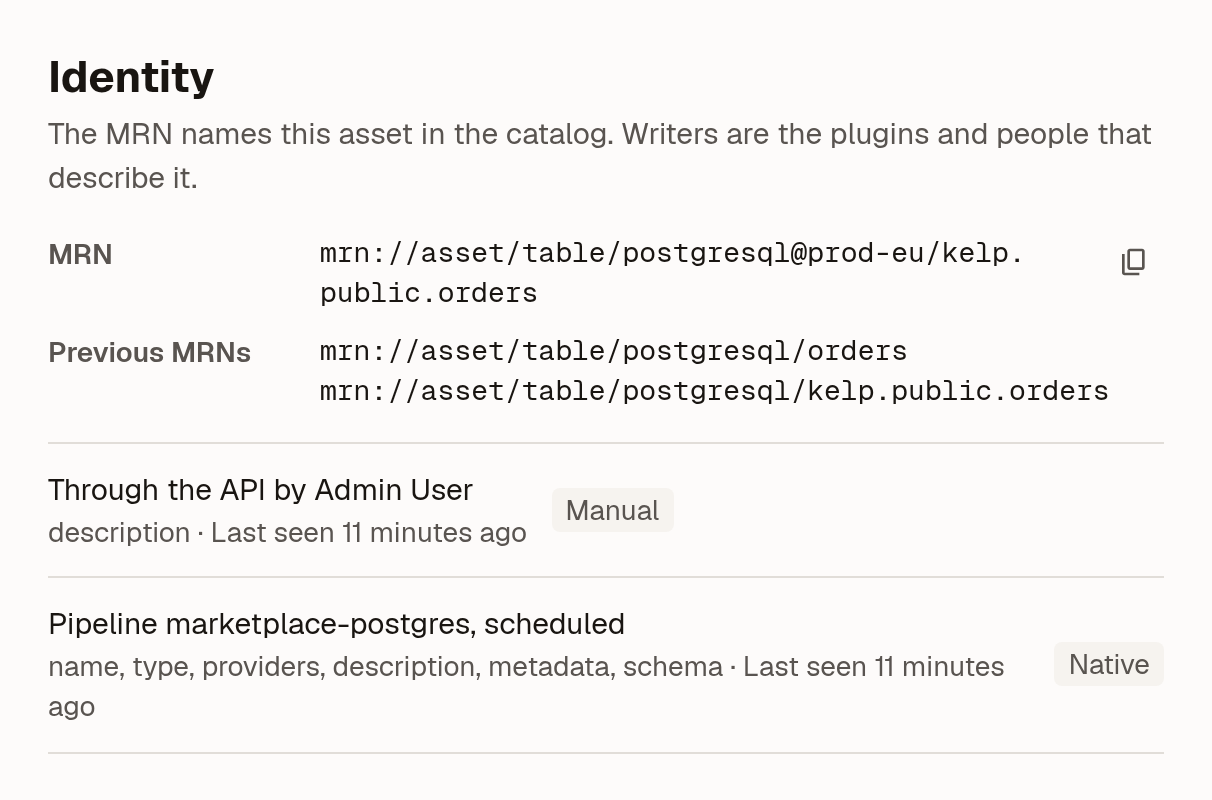
The same identity is available outside the UI:
- CLI
- API
marmot assets identity <asset-id>
It prints the asset's MRN, zone and previous MRNs, then each writer with its role and when it last saw the asset.
curl https://marmot.example.com/api/v1/assets/identity/<asset-id> \
  -H "X-API-Key: <api-key>"
The response has the asset's MRN in parts, the MRNs it used to have and every writer's contribution.
To describe an asset yourself, as a manual writer, name it by its MRN. Marmot creates the asset if nothing has that MRN yet, and otherwise adds your description to it:
- CLI
- Terraform
- API
marmot assets upsert \
  mrn://asset/table/postgresql@prod-eu/analytics.public.orders \
  --description "One row per order, from payment authorisation."
Leave out --name, --type and --providers and Marmot takes them from the MRN.
Set mrn on a marmot_asset, or set zone and let Marmot build the MRN from the type, provider and name. See Choose the asset's MRN.
Send the MRN and your fields to PUT /api/v1/assets/by-mrn, as in Create or update an asset by MRN.
Two assets in one pipeline run with the same MRN are never merged. The run fails both with an error that names them, because the plugin has to tell them apart.
Assets that disappear from a source
A pipeline that stops seeing an asset withdraws its own contribution. Marmot deletes the asset only when no other pipeline, person or integration still describes it, so a table that Trino stops listing stays in the catalog while the PostgreSQL pipeline still finds it.
Each run belongs to an owner: the pipeline for scheduled runs, and the user or service account for runs from the CLI or API. Two people running the same pipeline file from their own machines don't delete each other's assets. marmot ingest --destroy withdraws the pipeline's contributions for every owner.
Merge two assets
Sometimes two assets turn out to be the same thing, and merging them keeps what people added to both. This happens when:
- Tables that shared one asset before the 0.13 upgrade now have their own MRNs, and the old asset belongs to one of them.
- An OpenLineage event or a Kafka Connect sink named a table before Marmot knew which zone owns its address, so it landed next to the real one.
- Someone created an asset through Terraform or the API under a different MRN from the one the plugin later found.
There's no UI for merging yet. <old-asset-id> is the asset to merge away and <new-asset-id> the one to keep:
- CLI
- API
Sign in once with marmot login https://marmot.example.com. The CLI needs no API key.
marmot assets merge <old-asset-id> --into <new-asset-id>
marmot mrn resolve <mrn> prints the id of the asset an MRN names. The merge command asks you to confirm; pass -y to skip the prompt in a script.
Send an API key with the request:
curl -X POST https://marmot.example.com/api/v1/assets/merge/<old-asset-id> \
  -H "X-API-Key: <api-key>" \
  -H "Content-Type: application/json" \
  -d '{"into": "<new-asset-id>"}'
Owners, glossary terms, data products, subscriptions, lineage and documentation move to the asset you keep, and the merged asset's MRN becomes its alias, so links to it still work.
Limitations
- Without a zone, two servers holding the same database and schema produce the same MRNs and become one asset. Give each pipeline a zone as soon as you catalog a second system of the same technology.
- A plugin that only knows an address, such as a Kafka Connect sink, lands without a zone until Marmot knows which zone owns that address. Point other plugins at the right zone to fix that.
- Tables that already shared one asset before you upgraded can't be split apart automatically. Merge the old asset into the right one.
Next steps
- Tell systems apart with zones: name each system and point federating plugins at it.
- Upgrade to 0.13: what changes when a catalog from an earlier release moves to qualified MRNs.
- Build a plugin: build MRNs in your own plugin.